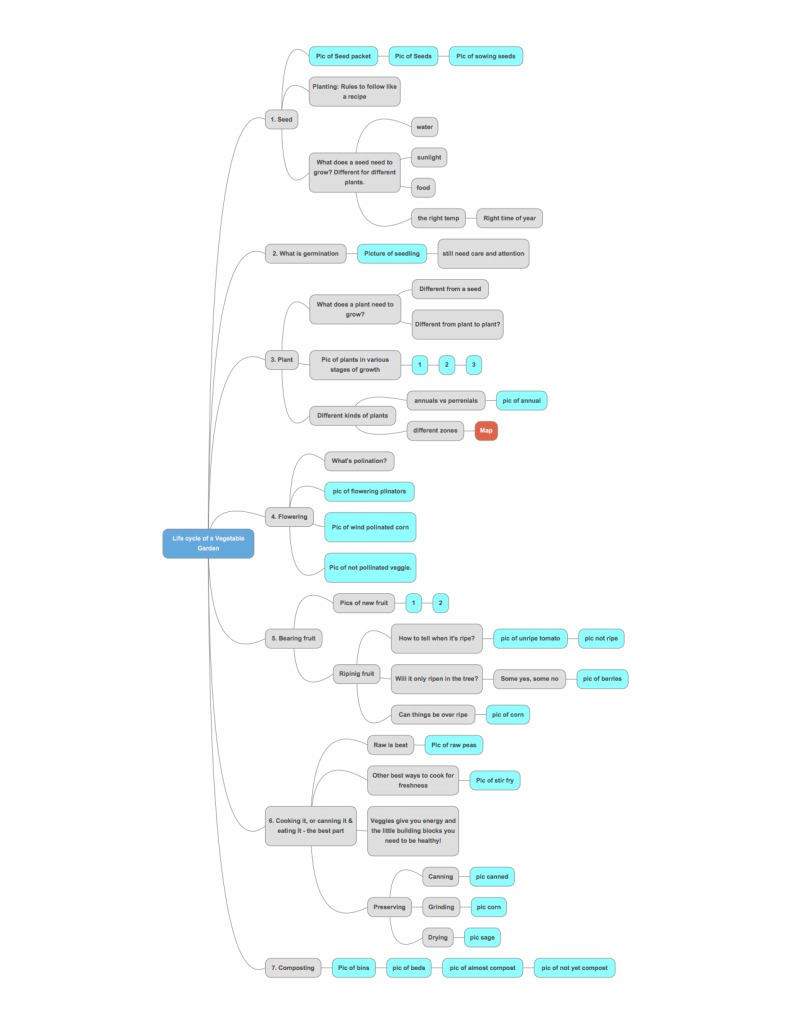
Mind Mapping, Part VII: Evaluating Chrome extension programsDec 18, 2015Here are my thoughts on the basic versions, one per post with pictures. 5. Connected Mind: This is such a hot mess, I’m not even sure what to say. It’s so insanely cluttered and crazy I couldn’t even make a test map. Here’s a capture of their example.
|
Mind Mapping, Part VI: What makes a good Mind Mapping programDec 16, 2015Believe it or not, this is where I started writing about Mind Mapping. This was going to be a single post about a few programs that I tried out. Turned into a series. I did use a mind map in planning parts of this! I hope it worked! The reason I started here was because I am in the market for a new and improved Mind Mapping program. I have used the very expensive Mindjet MindManager for several years. Beyond the expense, it has flaws. And, now it is not letting me access saved maps. So, I’m forced to move on. I originally chose it because it seemed to be one of only a few programs that ran on a mac. But it is full of stuff I don't need and never printed right. No matter how big a map, I couldn’t figure any way to print it in more than one page. It get's really, really tiny! In the past I have also tried FreeMind. (I think that's what it's called.) It is free, but was so basic as to not be so useful. This time around, I figured there should be more options. As it turns out there are. I decided to start by taking a look at programs which were available as extensions for the Chrome browser, which I use as my default on my mac and love. But I don’t see why they wouldn’t work on on any system as long as you install Chrome (free!) There appear to be 5 options. I tried all of them and evaluated them based on what I think makes them worth it or not. Because the bottom line is that it has to be easier and/or more functional than a pen and paper Mind Map would be. If it is frustrating or lacks functionality, what good is it? Of course, I filter my likes/dislikes through my knowing of what works for our ADHD brains and with years of experience using mind maps. My criteria are as follows:
As a caveat, these are for the free versions. As some point I'll evaluate Pricing of the full versions of the programs I recommend. Ultimately, I’ll give another review of the paid version of whatever I choose to buy. Finally... My evaluations begin in my next post.! My Blog Disclaimer: As a way to encourage myself to actually post entries, I have made a conscious decision not to go back and edit much, if at all. I do not apologize for any typos, grammatical errors, or things that could be better! Done & posted is always better than not done perfectly.
|
Mind Mapping, Part V: Making my own systemDec 14, 2015At some point I realized that I needed to combine these two disparate ideas in to one process. Since then, I have started with a Mind Map. I think of it as “throwing up my ideas” without rhyme, reason, structure, or too much thought. I use a big piece of paper (if I’m not using the computer at this point) and make the bubbles without any connections or lines at first. This is beautiful for many reasons. I can get my ideas out super quickly without worrying I’ll forget the next one while I’m overthinking the last one. I don’t need to decide in the moment if an idea makes the cut or not. And, there’s no considerations for ordering them. Once all the ideas are out, I start drawing arrows, crossing out the ideas that (though good) aren’t necessary to prove my thesis, and numbering the topics. The numbering is the key step that no one taught me when they introduced the “spidergram.” This is where the working memory deficit is most compensated for. And, I can attest to how important it is. To this day, I can’t look at that Mind Map and put all the topics in order the first time. (In hand written form) I always end up missing something in the sequence and having to go back to add in… which is easy when you are numbering bubbles, and very hard when you’ve already written 3 pages and realize you’ve missed an important point. But, back to the numbered Mind Map… At this point it is cluttered and crazy, but there is an order to it. The bright red numbers next to each bubble tell me what’s first, next, etc. But, it’s not so pretty to look at and still pretty bare bones. So, that’s when I transferred the information to a standard outline and add any additional sub points to flesh out what I wanted to say. (All done in short hand and abbreviations.) Then, at last, I’m ready to start the paper. The clarity, freedom, and power that I feel when I begin to sit down to write a paper (or anything else) with that outline done is hard to overstate. All the organizing has been done. All I need to do is create good sentences, make smooth transitions, and make sure spellcheck is working! This is how writing became easier for me. And faster! And better! The beauty of the modern Mind Mapping program is that is mostly eliminates the need to make the second outline. Consider; floating topics if you don’t know where they go yet, moving the bubbles around, adding sub-bubbles the second stage, crossing stuff off without making a mess, and reordering as needed. My “notes” for a speaking engagement or a presentation are often just a thorough Mind Map. That saves time and energy. And that’s the name of the game for us ADHDers! Up next is my criteria for what a good Mind Mapping program should be... My Blog Disclaimer: As a way to encourage myself to actually post entries, I have made a conscious decision not to go back and edit much, if at all. I do not apologize for any typos, grammatical errors, or things that could be better! Done & posted is always better than not done perfectly.
|
Mind Mapping, Part IV: The tools I was givenDec 11, 2015I have always taught a two step outlining process. It is a system I cobbled together based on two things I learned probably 5 years apart in school, each of which serves a different function for my ADHD brain and weren’t particularly helpful on their own. But, when put together they formed a system that compensated for my executive function deficits and allowed me to start leaning how to be a good writer. I’m going to take you through the whole process and explain why it works. But, with mind mapping software that is good enough, you can get it down to almost a one step process that saves even more time. So, remember that the goal is to separate the writing from the organizing. I was taught to make a “spidergram” around 4th grade. It is essentially a prehistoric Mind Map. We would draw circles on the paper each with an idea in them. Then we would connect the circles in some meaningful way. We were then supposed to be able to translate that into a writing assignment, probably a book report at that point. I liked getting my ideas out on paper. But I never felt that it helped with my organization because the paper just looked like the mess that I felt was already in my head. In high school I learned how to make a standard (Harvard style) outline. You know the one that starts with roman numerals, then indents to capital letters, then number, etc. This is how I was taught to take notes. (Which mostly worked in classes where the teacher’s presentation was organized and linear.) It is still how I take notes, more or less. But it didn’t help me write a paper. Because the amount of organization that needed to happen in my head to get my thoughts to come out in the right order was no more feasible for writing an outline that it was for a paper. My next post will explain how I created my own system from these ideas. My Blog Disclaimer: As a way to encourage myself to actually post entries, I have made a conscious decision not to go back and edit much, if at all. I do not apologize for any typos, grammatical errors, or things that could be better! Done & posted is always better than not done perfectly.
|
What does a mind map look like?Dec 10, 2015
|
Mind Mapping, Part III: Separating the organizational work from the actual writingDec 9, 2015So, why does Mind Mapping help with the writing process? In light of the idea that we are asking our brains to do too much at once when we are writing and organizing our thoughts at the same time, it makes sense to separate those processes and focus on one at a time. If we front load the process with all/most of the planning, when we get to the writing it is much easier, faster, and the end product is far better… with far less editing. I’d like to put in an important note about why ADHDers tend not to engage in this planning process of their own volition or even acknowledge that they should. Well, the planning, focus, executive function part is the hardest for us. Yes, the writing precess without planning can be torture. But, at least we get to try to express ourselves, argue a point, and play with language. (Things that many of us enjoy at least a little.) We tend not to want to do all the boring and difficult planning stuff first. Plus, anxiety often plays a role and it feels urgent to just start writing… even if there isn’t much direction there, it can emotionally feel like more is being accomplished because there are words on the page. I liken it to being lost in the woods. You can just start walking. It may give you a sense of progress and self determination. You are, in fact, going somewhere! But, what if you aren’t going in the right direction? What if you’re just going in circles? What if you are walking away from the search part? You are much better off taking the time to formulate a plan, even if it means leaving later, but making sure you are going in the right direction. Read my next post to see how and why I put all this together... My Blog Disclaimer: As a way to encourage myself to actually post entries, I have made a conscious decision not to go back and edit much, if at all. I do not apologize for any typos, grammatical errors, or things that could be better! Done & posted is always better than not done perfectly.
|
| page | 1 | 2 | 3 | 4 | 5 | 6 | 7 | 8 | 9 | 10 | next | previous |